
It has been over a month since Hytale released into early access, and development has been going strong. The developers have already shipped two updates, and today marks the release of Hytale Update 3.
Hytale Update 3 brings many exciting and highly requested features to the game. Some of the new additions include animal taming (still in its early phase), map markers for multiplayer gameplay, multiple avatar profiles, a crop-harvesting tool called the sickle, lots of new cosmetics, improvements and changes to combat, and more.
Read the complete official patch notes for Hytale Update 3 below to find out everything new and changed in the game.
Hytale Update 3 patch notes
Headline Features
Animal Taming
- “Added an early version of taming! Some of the friendlier animals you find in your adventures can now be tamed, provided you have their favorite food in hand
- Tamed animals can be petted with an empty hand and fed once in a while – some of them can also be milked, sheared, or mounted
- Tamed animals won’t run away from players (unless they’re hit), and will occasionally greet them
User-Placed Map Markers
- Create custom markers anywhere on your map with customizable names, icons, and colors
- Share markers with other players in multiplayer
- New gameplay settings to toggle marker visibility on map and compass
- Delete markers via the map context menu
Localization
- Brazilian-Portuguese and Russian have been added as the first new in-game language options.
Avatar Presets
- Edit, save, and swap between up to 5 Avatar customizations
Sickles
- Added Sickles, capable of harvesting multiple crops in asingle swing
Climbing Overhaul
- Updated climbing, enabling side-stepping, dropping down, and rotating around ropes
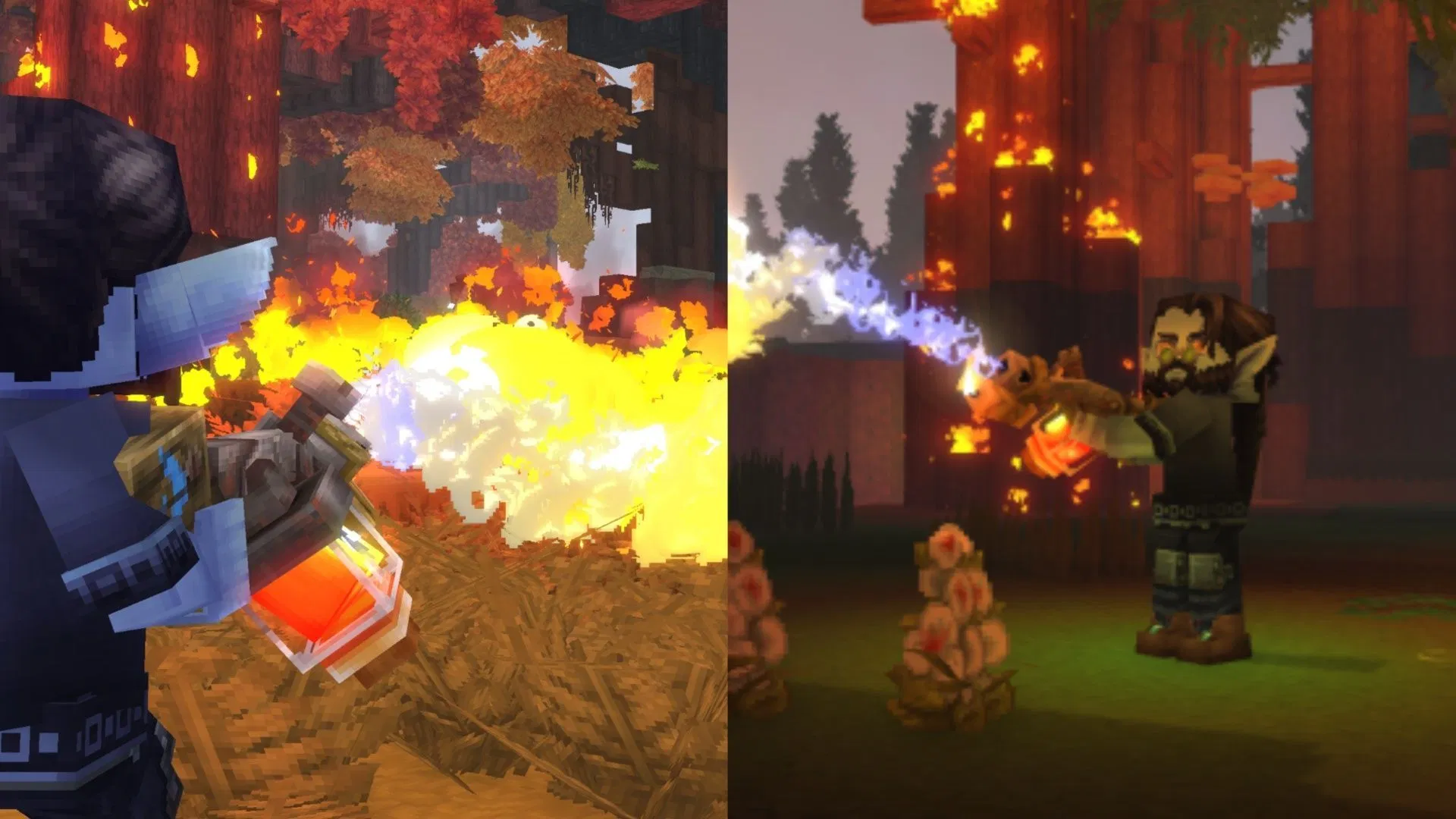
Fire Spread System & Goblin Flamethrower
- Added a new fire spread system (fluid ticker) and the Goblin Flamethrower
- Can be used to unleash flames upon nearby foes
- Creative mode only for now
Grass Spreading
- Added random block ticking and the spreading of grass
Anchor UI System
- Added an Anchor UI system, enabling server plugins to add UI elements to client pages, such as the world map. This will allow modders to insert into various predefined points as we add them
Avatar & Cosmetics
New Clothing & Accessories
- New Hat: Tweed Hat
- New Overtop: Mage Shirt
- New Shoes: Styled Flats, Wedge Shoes, Shaped Sneakers
- New color variations for Fashionable Shoes
- Added Construction Hard Hat
- Spiked Bracelets
- Hairband
- 2 new Skirts (Plaid and Punk)
- Added Black and Red Iron color variation for metals
Hair & Face
- 6 new Haircuts: Spikey Mohawk, Magical Pigtails, Double Braided Ponytail, Long Braided Ponytail, Puffy Bubble Braids, and one additional new haircut
- Updated visuals for the Morning haircut
- 4 new Facial Hair Styles: Split Moustache, Pinstripe Moustache, Anchor Beard, Viking Beard
- 2 additional Eye Shapes
- 2 new Makeup Variations (Blush and Eyeliner)
Other
- Overpants are now referred to as Legwear
Combat & Items
Weapon Adjustments & Fixes
- Adjusted damage value inconsistencies and upgrade differences across some weapon tiers
- Adjusted the guarding stamina costs that were previously misconfigured for certain drop-only weapons
- All spear types should now consistently stack up to 5 and be throwable
- Updated ranged weapon aiming ballistics (Improved accuracy, Added randomized hitbox offsets, Added VisAiming debug flag)
- Shortbows and Crossbows can now use ammo directly from the backpack
Necromancy Grimoire Improvements
- Summons no longer take damage from their summoner (and vice versa)
- Summons now respond when the player is attacked, not just when attacking
- Summons are faster and more aggressive
- Added variety to the types of skeletal minions that are raised, including a ranged variant
NPC & Enemy Changes
- Refactored Rhino Toad attacks
- Updated several NPCs with improved target switching behavior
Misc
- Improved in-hand positioning for Ingots and Sticks
Gameplay
Map & Navigation
- Updated map marker icons and improved their display resolution
- Player names are now always rendered on the map and are more readable when zoomed in
- Compass now shows different icons based on vertical distance (above/below you)
- Teleport option is now hidden for map markers when in Adventure gamemode
- Updated Player, Spawn, and Home icons
- Improved World Map marker text clarity
Inventory & Interaction
- Sort keybind now works in the player’s inventory
- Added “Take All” functionality for processing bench output items
- Shift-dragging now quickly transfers items between inventories
- Reworked utility wheel quick swap to include the inactive slot
Crafting & Benches
- Reduced Farming Bench tier requirement for Chicken Coop from 5 to 3
- Updated the requirements for Farmers Benches (Tier 4 now requires Drywood Log instead of Redwood Log, Tier 6 now requires Redwood Log instead of Drywood Log)
- Updated the crafting times for several early-game items (Crude ammo, weapons, and tools now craft instantly, Builders Bench craft time reduced from 3 seconds to 2 seconds, Chicken Coop craft time reduced from 4 seconds to 2 seconds)
- Dough is now produced using refillable Tankards
- Tankards are now crafted via the Farming Bench
World & Entities
- Doors no longer close when blocked by entities or players
- Teleporters now require you to clear a short distance before re-use
- Minecarts no longer move when stuck
- Large Kweebec Chests now support placing blocks on top
- Fixed NPCs in a Coop transforming into other NPCs
- Fixed being able to capture a dead NPC with the Capture Crate
- Klops Merchant no longer trades signs
- Ophidiophobia mode now replaces Hatworm with Larva_Silk model
Systems
- Improved Fluid, Mounts, and Crafting systems
- Improved multiple modules: Teleporter, NPCReputation, NPCObjectives, Farming, Memories, Camera, and Bed
Blocks & World
New Blocks & Variants
- Re-added Incandescent Volcanic Rock
- New block textures and variants (Thorium Cracks, Basalt Cracks, Magma Cracks, Mud Dry Cracks)
- Updated crack variants for 4 Ore blocks
- Added Lime block variants (Lime Gravel, Lime Rock, Lime Rubble, Medium Lime Rubble, Lime Stalactite (Large and Small))
Textures
Weather & World Settings
- Added Default_Flat and Default_Void weather configurations for their respective world instances
Content & Encounters
Environments & Regions
- Added complex spawn locations in the Taiga region, especially near rivers
- Improved weather VFX for Zone 1
- Integrated new Outlander village environment
- Refactored encounters across all zones
- Added new encounter environments (Zone 3 Trork, Zone 4 Village and Forest, Zone 4 non-Forest and non-Swamp biomes)
- Standardized spawn marker deactivation range to 150
NPCs & Creatures
- Added a green variation of the Rhino Toad
- Updated a number of prefabs, removing workbenches and chicken coops from several of them
Furnaces
- Added T2 Furnace (New model, textures, and animations)
- Updated visuals for T1 Furnaces
Audio
- Updated sword swing and impact sounds
- Implemented separation between Stereo Headphone and HRTF Headphone modes (Output mode options have been extended to cover Speakers (Stereo), Headphones (Stereo), and Headphones (3D Audio))
- Increased max instance limit for Furnace opening sounds
UI & Quality of Life
- Added Bed sleeping notifications (Notifications and SFX now play when other players attempt to sleep)
- Added Window Size option in video settings
- Moved container action keybind indicators to a better position
- Updated chest/bench keybind tooltips when keybinds are unassigned
- Updated workbench chest connection radius text to be clearer
- Updated feedback interface (Bug reports separated from other feedback)
- Warps are now sorted alphabetically in Teleporter UI
- Reduced context menu background opacity
- Cleaned up text and updated death messages
- Implemented HideFromTooltip in EntityStatType
- Added a confirmation message when attempting to swap Avatar Presets with unsaved changes
- Added an Avatar Presets counter to the Add Preset button
- Improved navigation of longer server lists
- Added a scrollbar to aid navigation for users with a large number of mods
- Added Font Fallback Support (Client now fetches glyphs from fallback fonts when missing, Enables support for non-Latin languages)
- Added Noto Sans as a secondary fallback font for Cyrillic glyphs
- Reworked item tooltips to better support localization
- Increased the dimensions of some UI elements to better support localization
Modding & Tools
Mod Management
- Added mod enable and disable support from UserData/Saves/
/mods - Added server version checks for plugins and asset packs
- Newly created asset packs are now enabled by default
- Added option to skip mod validation in single player
- Mod validation issues now block server startup unless flagged
- Added a warning when loading into worlds with missing mods
- Added duplicate plugin detection warnings
Creative Tools
- The Creative Hub is now referred to as the Crossroads
- Added a ‘Return to Crossroads’ button on the World Map for Creative Worlds
- Added /layer command (Applies layering to selected areas)
- Updated Paste tool (Hold-down key support, Undo and redo, Smoother multi-directional movement)
- Changed the draft brush shape to Sphere, instead of Cube
- Entities will now rotate and render in the Selection tool’s rotate/translate mode
- Added parameter to toggle replacing empty block materials
Machinima
- Removed some older debug commands and improved validation for the Machinima tool
- Added the ability to change the playback speed within the Machinima tool
Debug & Visualization
- Added 3D audio source visualization for debugging
- Added NPC sensor and view debugging visualization
- Added a new debug flag, VisLeashPosition, enabling visualization of NPC leashing
- Added a new debug flag, VisFlock, enabling visualization of flock membership and structure
Technical
- MapEditor and ListEditor now use correct models
- Added Test NPC for showcasing multi-interaction setups
- Updated packet handlers for builder tools to utilize the World packet handler for world-specific packets
- Renamed light radius to bright radius and set the default to 1 so that light color is maintained
World Generation
- Added exact rotation support for Materials
- Added Bound PositionProvider for Spawn Meshes
- Added YSampled Density node
- Performance optimization for WorldGen V2
- Added configurable spawn positions for portal biomes
Performance, Stability & Bug Fixes
Security
- Fixed directory traversal vulnerabilities in worlds and prefabs
- Fixed an exploit that could allow users to run commands on behalf of other connected players
Performance
- Improved world generation performance
- Optimized client asset sizes
- Updated the world map and chunk updates to use their own streams
World Configuration & Reliability
- Improved World Configuration Reliability (Atomic file saving, Updated backup handling, Corrupted worlds now display warnings and modal dialogs)
Crash Fixes
- Fixed a crash related to creative tool previews when undoing & re-applying very large changes
- Fixed a crash when a skin fails to be saved
- Fixed a crash on Linux when opening a folder without Nautilus installed
- Fixed a crash when overriding read-only asset packs
- Fixed spawn suppression system crashing when regenerating chunks
- Fixed plugin-related world crash handling
- Added startup exception handling for plugins
- Fixed multiple Null Pointer Exceptions
World & Block Fixes
- Fixed filler blocks not breaking in some cases (e.g. large doors)
- Fixed block placement mis-predictions
- Fixed Volcanic Cobble incorrect spawning
- Fixed Magma Adamantite block tiling
- Fixed upside-down stair connections
- Fixed sharp biome interpolation
- Fixed missing biomes on biome map
- Fixed Darkwood Decorative Block drops
- Fixed WorldStructure spawn Y constraints
- Fixed V2 WorldGen environment saving
- Fixed MaterialCache prefab loading
- Fixed Outlander house anchor offsets
- Fixed some Apple Trees floating off the ground
- Fixed fire spreading above 256 blocks
- Fixed village furniture items incorrectly requiring a pickaxe to break
- Fixed cloud rendering issues during weather transitions
Mount & Travel Fixes
- Fixed issues when changing worlds while mounted (Fixed minecart mount state not being removed correctly, Fixed horse mount state not clearing correctly)
- Fixed screen fade issues that could occur during world transfers
- Fixed chunk saving deadlocking when removing a world
- Fixed respawning inside a portal world leaving the player in a zombified state
Gameplay Fixes
- Fixed spawn seeds initializing to zero
- Fixed crop hitboxes and produce resource types
- Fixed dropped item IDs for BottleTree and Crystal Trunk
- Fixed pickup items missing components
- Fixed dying causing some carried items to become unusable due to durability
- Fixed some fish spawning in lava
- Fixed interactions without entities
- Adjusted the player hitbox when sitting and sleeping
- Fixed full-bright toggling not applying when entering Creative mode
UI & Display Fixes
- Fixed localization issue with maximize window setting
- Fixed tooltip name wrapping issues
- Fixed cosmetic ordering issues
- Fixed incorrect mod list display
- Fixed Slothian gradient mapping
- Fixed key binding information not displaying correctly
- Fixed debug frustums not rendering
- Fixed advanced workbench model display
- Fixed performance metrics affected by FPS cap and VSync
Audio Fixes
- Fixed water emitter radius so audio plays properly in stereo instead of just the left ear
- Fixed audio emitter entities not playing correctly
- Fixed fluid ambient effects not triggering properly
- Fixed extreme audio panning with HRTF
- Fixed ambient and bench sound origins
Modding & Plugin Fixes
- Fixed EntityTrackerSystems validation gaps
- Removed hardcoded keybindings
- Fixed manual spawn beacon command
- Fixed Teleporter name overrides and SFX
- Fixed Machinima player teleport behavior
- Fixed Camera Translation Gizmo mode
- Fixed server configurations incorrectly enabling all mods by default
- Fixed client worlds not enabling backups by default
- Added missing validation to reduce IllegalStateExceptions
- Fixed copied entities incorrectly sharing data structures
Other
- Improved null and data-flow handling
- Fixed multiple memory leaks
- Updated some grammar and removed some typos”
That is it for Hytale Update 3. Fans should expect a pre-release for Update 4 in the coming weeks, as revealed by Simon last week.
Related: Hytale taming guide: How to tame animals
Are you stuck on today’s Wordle? Our Wordle Solver will help you find the answer.
Edited by Manish Kumar Choudhary