
The Delta Force 2nd Anniversary Twitch Drops are now live, giving players a chance to claim a few exclusive rewards. Players can earn four exclusive in-game items while watching the event, with an additional reward available for those who subscribe during the stream. These include weapon skins, a Calling Card, and more, all available for free for a limited time.
This article guides you on how to get all Delta Force 2nd Anniversary Twitch Drops items.
All rewards from Delta Force 2nd Anniversary Twitch Drops
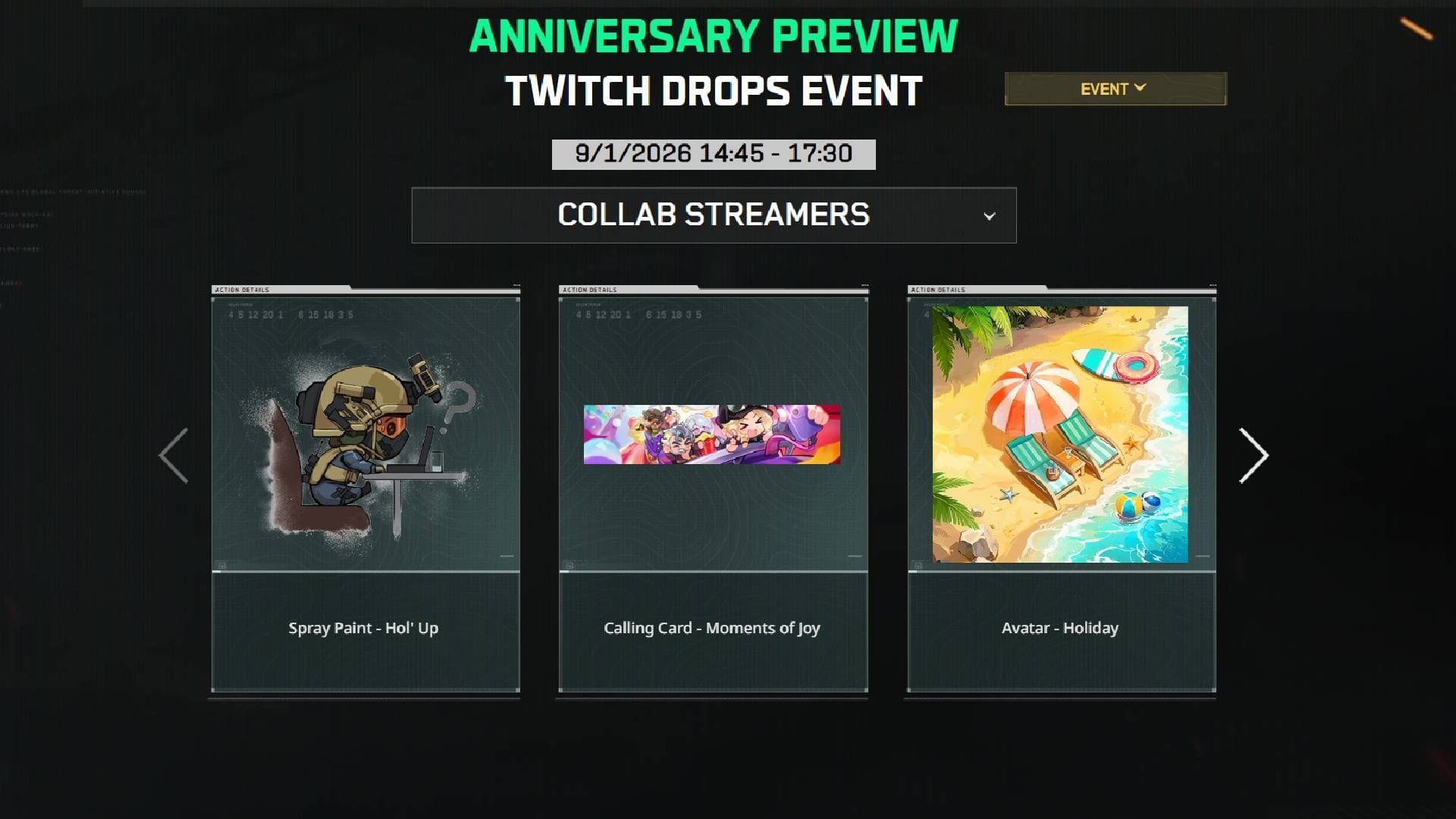
There are five items that players can claim during the event simply by staying tuned to Twitch and watching the broadcast. Here’s a list of items that participants will get from Delta Force 2nd Anniversary Twitch Drops:
- HOL’ UP: Spray Paint (Watch stream for 15 minutes)
- Moments of Joy: Calling Card (Watch stream for 20 minutes)
- Holiday: Avatar (Watch stream for 30 minutes)
- Vector Submachine Gun: Playtime (Watch stream for 45 minutes)
- MP5-Relentless Assault (Subscription reward)
Read more: Best weapon build codes for Delta Force
How to get all rewards from Delta Force 2nd Anniversary Twitch Drops
Players can collect all the rewards just by tuning into the Delta Force 2nd Anniversary Season Dev Stream on Twitch and spending the required amount of time, as mentioned in the reward list above.
The event will feature four rewards that players can earn by watching the stream and reaching the required milestones, along with one additional reward that can be obtained by subscribing during the event. If someone is unaware of how to link their accounts and claim all the freebies, here’s a step-by-step guide:
- Step 1: Go to the Delta Force website and log in to your account.
- Step 2: Then click on “Link your Twitch account” to connect your Twitch account to your Infinite account.
- Step 3: Go to Twitch and watch an eligible Delta Force stream with Drops enabled.
That’s it. Once you’ve hit a viewing milestone, open up your Twitch Drops and Rewards tab to claim your reward. You can unlock the first reward by watching the Delta Force 2nd Anniversary Season Dev Stream for 15 minutes, and the rest will start becoming available as you continue to watch.
Also read: Best M700 build in Delta Force
You don’t have to actively watch the stream from start to end. As long as you’re watching an eligible Twitch channel that has Drops enabled, your viewing progress will continue to play in the background. Just make sure your Twitch account is linked to your Delta Force account beforehand, so that your rewards can be claimed in your game account.
If you can’t find a reward in your Twitch Drops inventory, don’t worry. Just sit back and continue to watch the stream for a little bit, and it should appear in your inventory. Sometimes, it takes a little bit of time to appear in your Twitch Drops inventory.
After claiming the items, make sure to log into the game and check your inventory to make sure they appear. Just keep in mind that unclaimed Twitch Drops rewards only stay available for a short period of time, so make sure to claim them as soon as they become available.
Check out the links below for more such guides:
Are you stuck on today’s Wordle? Our Wordle Solver will help you find the answer.
Edited by Pranoy Dey